Train3D by Franklin Safari is an iOS workout, nutrition, and wellness app. It is not TRAIN3D Australia (Procedos equipment), not a VR industrial trainer, and not the Consistent3D research paper.
Train3D workouts and progressive overload
Catalog programs that change the load after you hit the top of the range, and a four-week curve that shows whether the week was strength- or hypertrophy-led.
Catalog programs (Plus and Elite)
| Program | What it is |
|---|---|
| Six Day Split | Strength plan, six training days plus Day 7 Rest & Recovery, with in-session form videos. |
| Three Day Workout | Shorter weekly plan when you cannot live in the gym. |
| V-Shape & Glute Split | Muscle-focused six-day plan (no rest day in the template). |
Progressive overload rule
Per exercise video, Train3D stores weight and rep targets. When you hit 12 reps at the current weight, it recommends +5 lb and resets the target to 6 reps. That is the shipped progression, not a slogan.
Workout logging
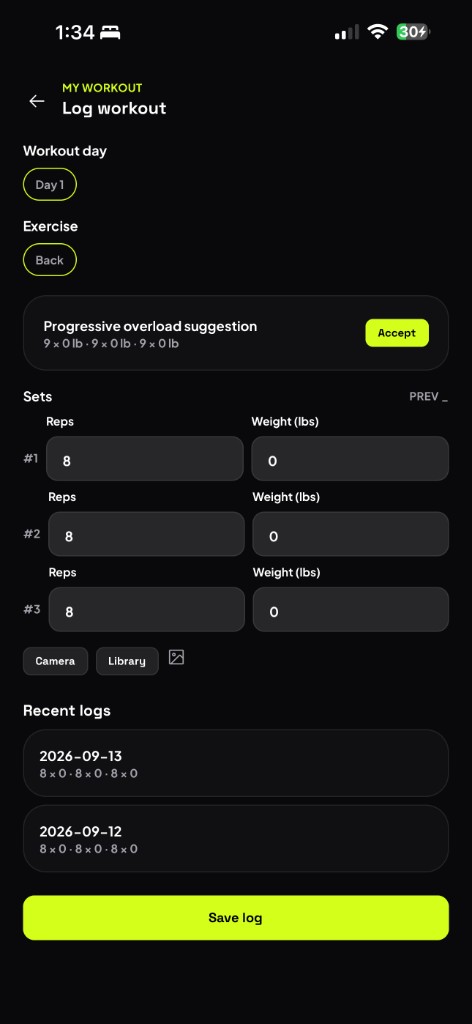
Log sets, reps, and weight on the session screen. Accept a progressive-overload suggestion, attach a camera or library photo, and reopen recent logs by date. The watch does not auto-count reps.
Four-week stimulus curve
Progress charts split volume into strength (4–6 reps) and muscle mass (8–12 reps), then label the block strength, muscle-mass, or balanced. Use this when you want to know if the week actually trained the quality you care about.
Elite builders
- Make a Custom Workout is a wizard for your goal, experience, and training days. The app composes the week from the catalog. Cap 20 generations per month.
- Build Your Split lets you pick build muscle or build strength, assign muscle groups across up to six days, then create the plan from the library.
- Create Your Own / Additional Workouts is an extra session outside the plan (photo, sets, reps, weight) without replacing the program you already follow.
- Equipment Scan is on the equipment scan page.
Health during the session
With Apple Health connected, Train3D can read heart rate and active energy while you train and write the completed workout back. It does not auto-count reps or infer load from the watch.
Some muscle library slots can show “Videos coming soon.” Form clips are MP4 videos, not AR avatars.